2019.03 mixtape
- Spotify: https://open.spotify.com/user/1235450353/playlist/0guisAxA5Q2WO6biLJqdU0?si=ln_WnOvHRaaOZoFImIl5Gw
- YouTube: https://www.youtube.com/playlist?list=PLSUh6oJ5ZotUlIMwWcbtV7FRTEzHqYm_7
2h 58m
2h 58m
 Ancillary Justice by Ann Leckie
My rating: 4 of 5 stars
‘Ancillary Justice’ is written in a first-person narrative as the AI of thousands of years old starship Justice of Toren of The Radchaai Empire. Another interesting part is since the Radchaai language is genderless, the narrator constantly describes everyone as “she,” but later you might discover that some character might be he. There are other small details here and there that narrator might say, but you start to question it as the story develops. In other words, Ann Leckie has done a stylish job of show-and-not-tell about the world that she’s built.
I wanted to run sbt inside Docker, so I created some images. The GitHub repo is eed3si9n/docker-sbt.
Over the holiday break I’ve implemented left TOC for Pamflet, and released it as Pamflet 0.8.0.
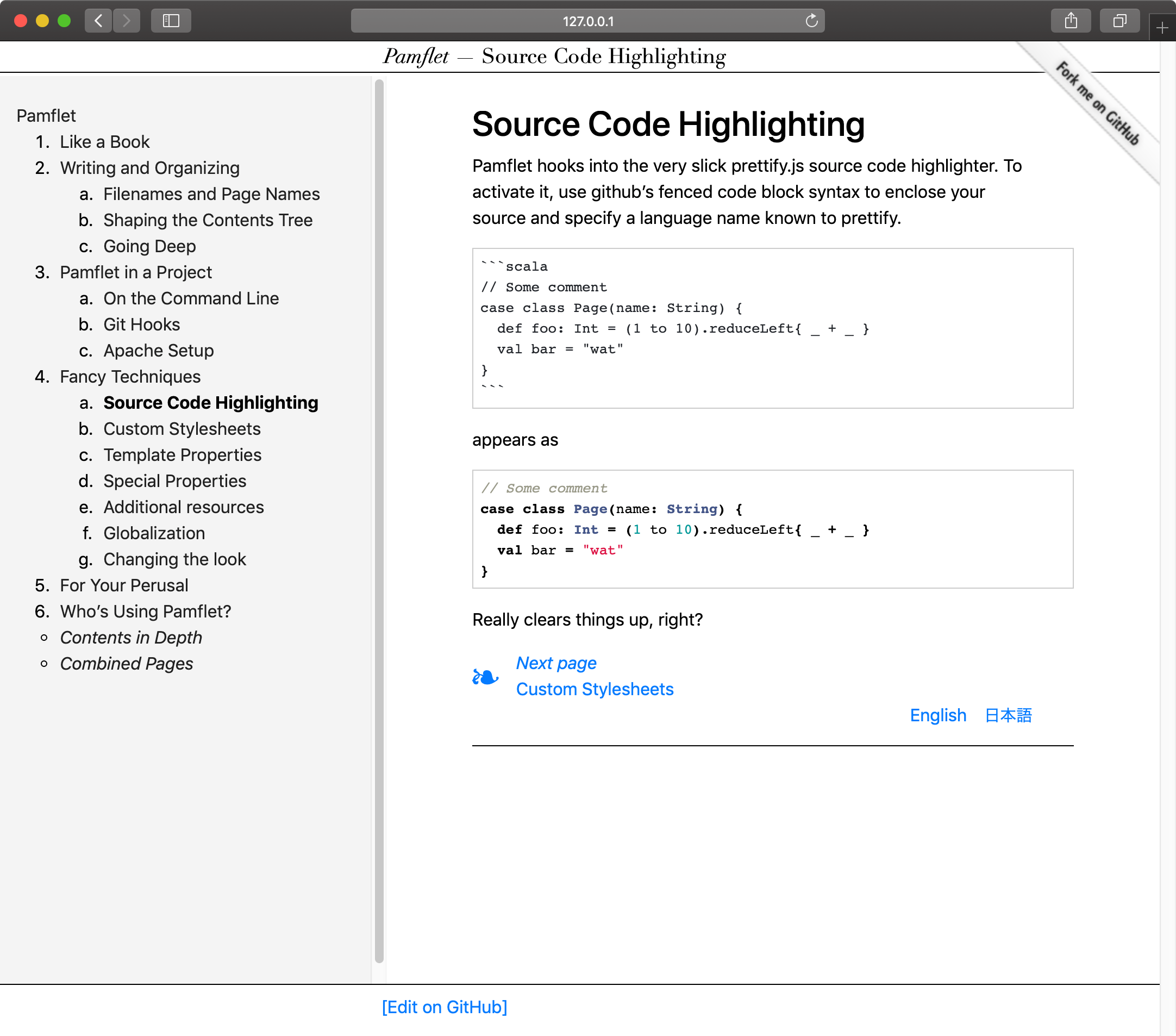
Pamflet is a publishing application for short texts, particularly user documentation of open-source software.

As of Scala 2.13.0-M5, it’s planned that scala.Seq will change from scala.collection.Seq to scala.collection.immutable.Seq. Scala 2.13 collections rework explains a bit about why it’s been non-immutable historically. Between the lines, I think it’s saying that we should celebrate that scala.Seq will now be immutable out of the box.
Defaulting to immutable sequence would be good for apps and fresh code. The situation is a bit more complicated for library authors.
Array(...)this change to immutable Seq could be a breaking change to your API.
3 h 28 min
We need to change the culture around tech conferences to improve the inclusion of women (and people from other backgrounds too!). For that, there needs to be clear signaling and communication about two basic issues
 Red Mars by Kim Stanley Robinson
My rating: 4 of 5 stars
Red Mars is a science fiction classic written in 1992. This book is everything I wanted and more, starting with first hundred astronauts and cosmonauts migrating to Mars to build the infrastructure such that more people can migrate. By the middle of the book, thousands of people migrate to Mars. The book explores various dimensions the epic project, not just technological challenges, but psychological effects, personality differences, and political interests by superpowers. The geography of Mars is written in vivid, majestic details.
I’ve implemented “super shell” feature for sbt over the weekend. The idea is to take over the bottom n lines of the termnial, and display the current tasks in progress.
Logs are useful in many situations, and sometimes it’s the only viable tool to find out what’s going on. But on a console app like sbt, using logs to tell the build user what’s going on doesn’t always work.
Compile, or compile not. There’s no warning. Two of my favorite Scala compiler flags lately are "-Xlint" and "-Xfatal-warnings".
Here is an example setting that can be used with subprojects:
ThisBuild / organization := "com.example"
ThisBuild / version      := "0.1.0-SNAPSHOT"
ThisBuild / scalaVersion := "2.12.6"

lazy val commonSettings = List(
  scalacOptions ++= Seq(
    "-encoding", "utf8",
    "-deprecation",
    "-unchecked",
    "-Xlint",
    "-feature",
    "-language:existentials",
    "-language:experimental.macros",
    "-language:higherKinds",
    "-language:implicitConversions",
    "-Ypartial-unification",
    "-Yrangepos",
  ),
  scalacOptions ++= (scalaVersion.value match {
    case VersionNumber(Seq(2, 12, _*), _, _) =>
      List("-Xfatal-warnings")
    case _ => Nil
  }),
  Compile / console / scalacOptions --= Seq("-deprecation", "-Xfatal-warnings", "-Xlint")
)

lazy val foo = (project in file("foo"))
  .settings(
    commonSettings,
    name := "foo",
  )
-Xlint enables a bunch of compiler warnings. @smogami contributed a page called Scala Compiler Options so we can now read what’s in -Xlint.
Working with GitHub and pull requests a lot, I end up accumulating stale branches that are no longer needed. In this post, we will look at how to clean the stale local branches.
There are mainly two strategies:
Erik Aybar’s Git Tip: Deleting Old Local Branches takes the second approach.
I’ve been thinking about rich console applications, the kind of apps that can display things graphically, not just appending lines at the end. Here are some info, enough parts to be able to write Tetris.
To display some text at an arbitrary location on a termial screen, we first need to understand what a terminal actually is. In the middle of 1960s, companies started selling minicomputers such as PDP-8, and later PDP-11 and VAX-11. These were of a size of a refrigerator, purchased by “computer labs”, and ran operating systems like RT-11 and the original UNIX system that supported up many simultaneous users (12 ~ hundreds?). The users connected to a minicomputer using a physical terminal that looks like a monochrome screen and a keyboard. The classic terminal is VT100 that was introduced in 1978 by DEC.
Whether you want to try using OpenJDK 11-ea, GraalVM, Eclipse OpenJ9, or you are stuck needing to build using OpenJDK 6, jabba has got it all. jabba is a cross-platform Java version manager written by Stanley Shyiko (@shyiko).
Here’s how we can use jabba on Travis CI to cross build using AdoptOpenJDK 8 and 11:
sudo: false
dist: trusty
group: stable

language: scala

scala:
  - 2.12.7

env:
  global:
    - JABBA_HOME=/home/travis/.jabba

matrix:
  include:
  - env:
      - TRAVIS_JDK=adopt@1.8.192-12
  - env:
      - TRAVIS_JDK=adopt@1.11.0-1

before_install:
  - curl -sL https://raw.githubusercontent.com/shyiko/jabba/0.11.0/install.sh | bash && . ~/.jabba/jabba.sh

install:
  - $JABBA_HOME/bin/jabba install $TRAVIS_JDK
  - unset _JAVA_OPTIONS
  - export JAVA_HOME="$JABBA_HOME/jdk/$TRAVIS_JDK" && export PATH="$JAVA_HOME/bin:$PATH" && java -Xmx32m -version

script: sbt -Dfile.encoding=UTF8 -J-XX:ReservedCodeCacheSize=256M ++$TRAVIS_SCALA_VERSION! test

before_cache:
  - find $HOME/.ivy2 -name "ivydata-*.properties" -delete
  - find $HOME/.sbt  -name "*.lock"               -delete

cache:
  directories:
    - $HOME/.ivy2/cache
    - $HOME/.sbt/boot
    - $HOME/.jabba/jdk
When the job runs you should see something like:
Last week I wrote about using source dependencies with sbt-sriracha for testing purpose. This week we’ll look into using Expecty to do power assert.
Power assert (or power assertion) is a variant of assert(...) function that that prints out detailed error message automatically. It was originally implemented by Peter Niederwieser (@pniederw) for Spock, and in 2009 it was merged into Groovy 1.7. Power assert has spread to Ruby, JavaScript, Rust, etc.
Let’s say you have something like a * b. Using a traditional assert, we would write:
Source dependencies is one of features that existed in sbt since ever, but hasn’t been documented well.
Here’s how to declare source dependency to the latest commit for scopt commandline option parsing library.
lazy val scoptJVMRef = ProjectRef(uri("git://github.com/scopt/scopt.git#c744bc48393e21092795059aa925fe50729fe62b"), "scoptJVM")

ThisBuild / organization := "com.example"
ThisBuild / scalaVersion := "2.12.2"

lazy val root = (project in file("."))
  .dependsOn(scoptJVMRef)
  .settings(
    name := "Hello world"
  )
When you start sbt and run compile, sbt will automatically clone scopt/scopt under the staging directory, and link the builds together.
Yesterday I wrote about cross JVM testing using Travis CI.
Here’s how we can test Scala apps on macOS using Travis CI. This is adapted from Lars and Muuki’s method: Testing Scala programs with Travis CI on OS X
dist: trusty

language: scala

matrix:
  include:
    ## build using JDK 8, test using JDK 8
    - script:
        - sbt universal:packageBin
        - cd citest && ./test.sh
      jdk: oraclejdk8

    ## build using JDK 8, test using JDK 8, on macOS
    - script:
        - sbt universal:packageBin
        - cd citest && ./test.sh
      ## https://github.com/travis-ci/travis-ci/issues/2316
      language: java
      os: osx
      osx_image: xcode9.2

    ## build using JDK 8, test using JDK 9
    - script:
        - sbt universal:packageBin
        - jdk_switcher use oraclejdk9
        - cd citest && ./test.sh
      jdk: oraclejdk8

    ## build using JDK 8, test using JDK 10
    - script:
        - sbt universal:packageBin
        - citest/install-jdk10.sh
        - cd citest && ./test.sh
      jdk: oraclejdk8

scala:
  - 2.10.7

before_install:
  # https://github.com/travis-ci/travis-ci/issues/8408
  - unset _JAVA_OPTIONS
  - if [[ "$TRAVIS_OS_NAME" = "osx" ]]; then
      brew update;
      brew install sbt;
    fi

cache:
  directories:
    - $HOME/.ivy2/cache
    - $HOME/.sbt/boot

before_cache:
  - find $HOME/.ivy2 -name "ivydata-*.properties" -delete
  - find $HOME/.sbt  -name "*.lock"               -delete
Normally you’d write jdk: oraclejdk8 at the top level, but since the macOS image does not have the jdk_switcher script travis/travis#2317, we need to add to all entries in the matrix except for the osx one.
Oracle is moving to ship non-LTS JDK every 6 months, and LTS JDK every 3 years. Also it’s converging to OpenJDK. In this scheme, JDK 9 will be EOL in March 2018; JDK 10 will come out in March 2018, and EOL in September 2018; and LTS JDK 11 that replaces JDK 8 in September 2018 will stay with us until 2021.
As we will see quick succession of JDKs in the upcoming months, here’s a how-to on testing your app on JDK 8, JDK 9, and JDK 10 Early Access using Travis CI.
During the SIP-27 trailing commas discussion, one of the thoughts that came to my mind was unifiying some of the commas with semicolons, and take advantage of the semicolon inference.

This doesn’t actually work. @Ichoran kindly pointed out an example:
Seq(
  a
  b
  c
)
This is interpreted to be Seq(a.b(c)) in Scala today.
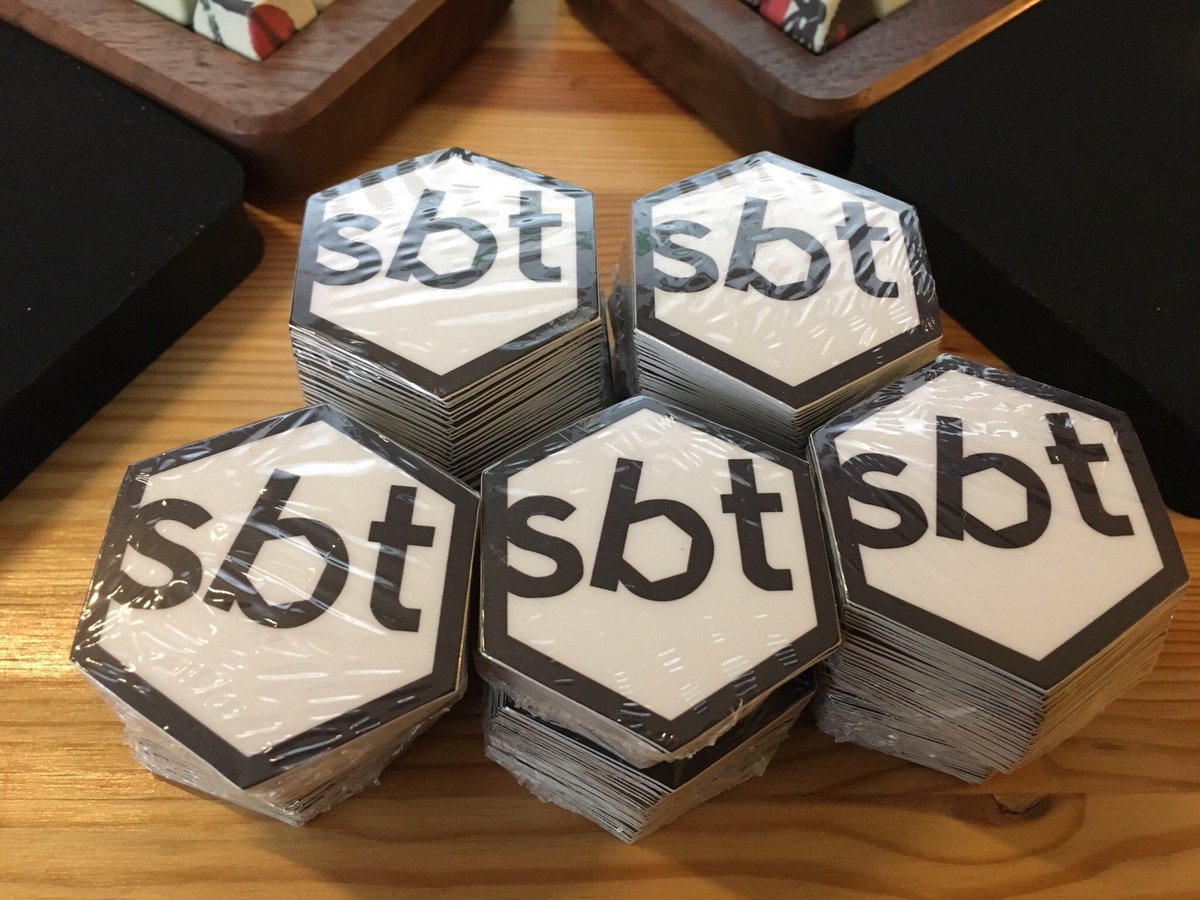
As tweeted, I made some sbt stickers.
Wrote herding cats: day 17 featuring initial and terminal objects, product, duality, and coproduct.

This holiday break, I somehow got into binge watching Coursera’s Stanford Machine Learning course taught by Andrew Ng. I remember machine learning to be really math heavy, but I found this one more accessible.
Here are some notes for my own use. (I am removing all the fun examples, and making it dry, so if you’re interested in machine learning, you should check out the course or its official notes.)
Machine learning splits into supervised learning and unsupervised learning.
In this post I am going to discuss an old new problem of encoding file path as Uniform Resource Identifier (URI) reference.
As of 2017, the authoritative source of information is RFC 8089 - The “file” URI Scheme written by Matthew Kerwin.
RFC 8089 The "file" URI Scheme https://tools.ietf.org/html/rfc8089 Wow, it actually happened.
— Matthew Kerwin (@phluid61) February 18, 2017
Future readers might also want to search for “file URI scheme RFC”, and find the latest version. If you’re a programmer, read the RFC. This post is to raise the awareness of the some of the issues around file to URI encoding, but it’s not a substitution.
On Tech Hub blog I demonstrated how to use sbt server from VS Code to display compiler errors from a running sbt session. In this post, I’ll show how to do that for Sublime Text 3 in this post.
First, add tomv564/LSP plugin to Sublime Text 3.
cd ~/Library/Application\ Support/Sublime\ Text\ 3/Packagesgit clone https://github.com/tomv564/LSP.gitNext, download sbt-server-stdio.js and save it to ~/bin/ or somewhere you keep scripts. sbt server by default uses Unix domain sockets on POSIX systems and named pipe on Windows, but editors seem to expect stdio. The script is a Node script that’s included as our VS Code extension that discovers the socket, and fronts it with stdio.
Over the weekend I assembled an Ergodox.

It’s been a month since sbt 1.0 shipped, and I can finally sit back and think about sbt server again. Using my weekends time, I started hacking on an implementation of Scala language server on top of sbt server.
A language server is a program that can provide language service to editors like Visual Studio Code, Eclipse Che, and Sublime Text 3 via Language Server Protocol. A typical operation might be textDocument/didOpen, which tells the server that a source file was opened in the editor.
In this post, I’d like to introduce a version scheme that I call Persistent Versioning. Most of the ideas presented in this post are not new or my own. Let me know if there’s already a name for it.
In 2015, Jake Wharton (@JakeWharton) wrote a blog post titled Java Interoperability Policy for Major Version Updates:
A new policy from @jessewilson and I for the libraries we work on to ensure major version updates are interoperable: https://t.co/zKqYRwrXmq
— Jake Wharton (@JakeWharton) December 11, 2015